
PowerSchool
Stay Connected with PowerSchool
PowerSchool is our primary tool for keeping you informed about your child’s learning journey. Use your parent account to track daily assignments, check marks, and view report cards. It’s also the quick and easy way to sign permission forms and submit payments for upcoming field trips, school programs, and books.
If you need help with setting up your account or have any questions about PowerSchool, please call the office at 780-987-3705.

Report Cards on PowerSchool
Viewing Report Cards as a PDF
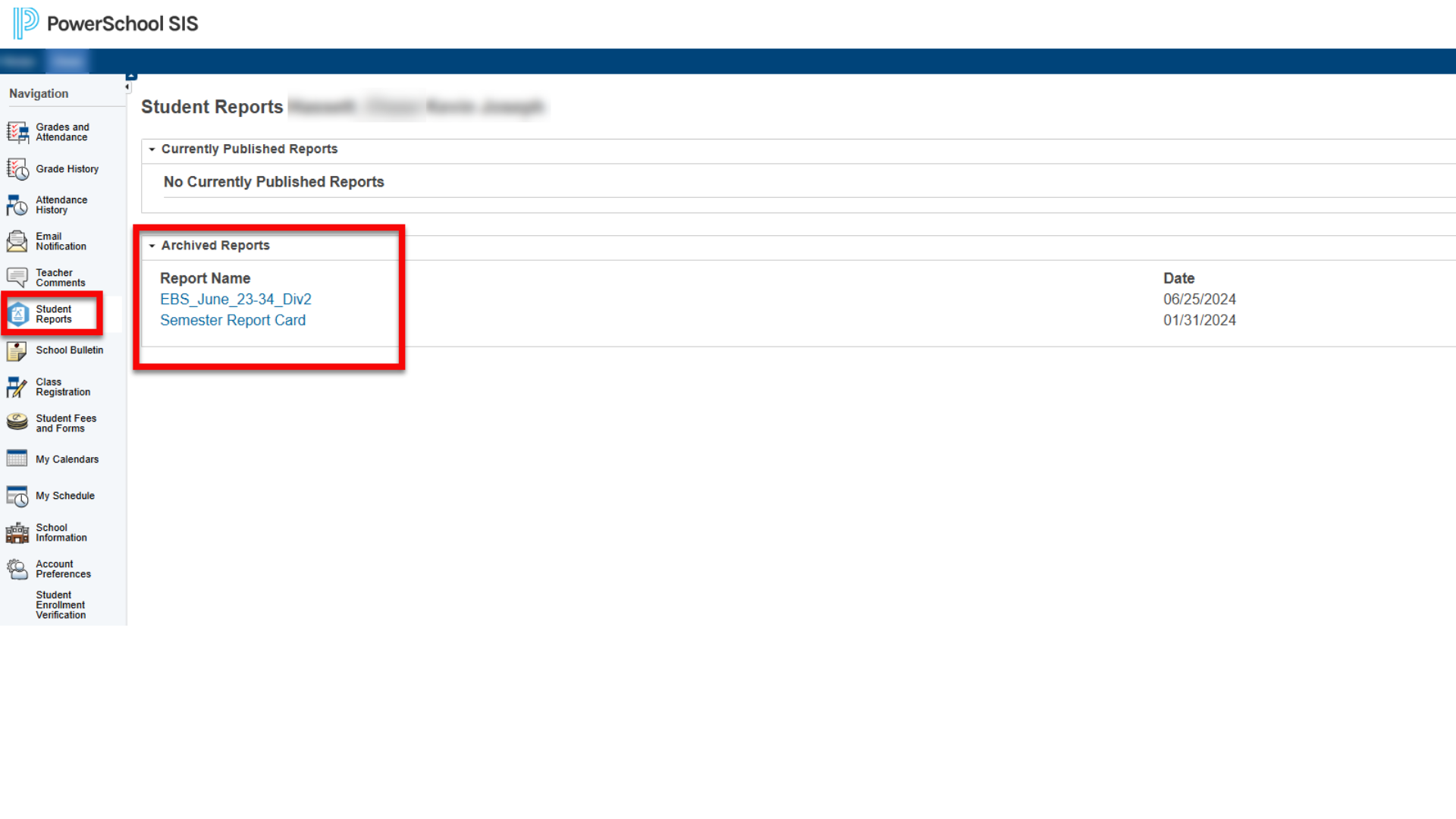
A parent can view the report card on the Parent Portal by clicking the Student Reports icon on the left hand side of the Parent Portal screen.
All archived report cards will be available for them to view and print.
Viewing Report Cards & Detailed Info

You can dive deeper into your child's academic progress by clicking directly on the percentage or grade in your PowerSchool portal. This opens up a detailed breakdown of all assignments, individual assignment marks, and specific teacher comments, giving you a complete view of their daily learning and achievements.
Understanding Your Child's Marks

School Messenger Parent Guide
The preferences section of the SchoolMessenger tool allows you to indicate how you want to be contacted – you may set your preferences in either the SchoolMessenger area of your PowerSchool parent portal or the SchoolMessenger app. Just click on the Parent Guide below for more information.